Category: Hardware

  • Why I’ve come to hate Wireless Earbuds

    Why I’ve come to hate Wireless Earbuds

    I have been using wireless and semi-wireless earbuds since they became widely available around 2015. During that time I had to go through five pairs of them. Over the years I have come to hate them, and I don’t think most people should be using them. Here’s why.

    Wireless Earbuds are manufactured e-waste

    Wireless earbuds are almost always built with a very limited lifespan. That is because the tiny batteries in the buds are especially short-lived and virtually irreplaceable. They are often charged at very high speeds and have a very low capacity. The consensus appears to be that the life expectancy of even premium wireless earbuds is only around 1 to 3 years. That is unacceptable given their typical price and it’s bad for the environment. One exception is earbuds with swappable batteries, like the Fairbuds. Even disregarding the batteries, repairability and durability are usually very poor.

    Wired Earphones do not have batteries, and thus last much longer. Their biggest weakness is indeed the cables which can get snagged and break. However these are often easily replaceable in more serious, but still cheaper, wired IEMs (In-Ear Monitors). Those earphones where the wires are not replaceable are often very inexpensive compared to even cheap wireless earbuds, so it’s more forgivable if they break after a few years of mishandling. I have had Xiaomi Piston wired earphones for ten years and they still work perfectly – not that I would specifically recommend these nowadays.

    Wireless Earbuds are unnecessarily expensive

    While there are some really cheap options now, the better wireless earbuds are just really expensive, often costing 5x or more than better sounding wired IEMs. Combined with their limited lifespan they can easily cost over 50€ per year of ownership, whereas a decent pair of wired earbuds costs less than that for many more years of usage. The aforementioned Xiaomi Piston I’ve had since 2015 cost 17€.

    Wireless Earbuds usually sound worse

    I am not an audiophile, but I have never listened to any wireless earbuds that sound as good as a decent pair of wired IEMs. Even comparing the pricey Sony WF-1000XM4 with LDAC codec to my 20€ Moondrop CHU II, the CHU sound significantly better. While the Sonys sound good I find myself always picking the CHUs or proper big headphones, whether wired or wireless, when I want the best experience.

    Wireless Earbuds are unreliable and hard to use

    Best case, wireless earbuds pair almost immediately and without going through any menus. That usually works well with modern smartphones. When it works perfectly, they might even be slightly more convenient to get connected than a wired earphone where you will have to route the cable. In practice over the years I have often had issues with dropouts, buds switching themselves off for no reason, range being poor or the buds not wanting to connect to older devices.

    The claimed battery life numbers are usually a joke. They are only achievable when certain features are turned off and only in the first few months of ownership. It’s nice that most buds charge quickly when you put them in the case. However, that fast charging is also what contributes to them losing capacity after half a year of use. And you know what would be nice? Earphones that don’t need batteries in the first place.

    Their features are mostly useless

    I have found the additional features of wireless earbuds to be lacking. The most prominent and interesting feature is Active Noise Cancellation (ANC). In practice, ANC in earbuds is pretty weak and only moderately better than the isolation provided by any IEM. Full-size ANC headphones are on a completely different level. Even my very old and half broken Sony WH-1000X are much, much better at ANC than my WF-1000XM4 earbuds. And it’s not like properly inserted wired IEMs don’t provide sound isolation.

    Audio passthrough is another feature that in practice I almost never use. I’d rather just take my earphones out and listen to my environment properly. This is also a more explicit signal to people around me that I’m listening to what they are saying.

    Most earbuds have terrible touch controls or only a single button you have to hold or push multiple times awkwardly into your ear. Inline remotes are far superior (although they have their issues as well).

    I also found the “ear insertion sensor” feature to be a nuisance due to its unreliability. That sensor is supposed to detect when you insert or remove a bud to pause and resume playback automatically. I’d rather have something that is explicit and reliable like pushing a button than hoping the sensor works correctly.

    Wireless Earbuds are mostly a scam by smartphone manufacturers

    It’s commonly opined that modern smartphones don’t have headphone jacks in order for manufacturers to push their customers to buy a disposable, short-lived high-margin item like wireless earbuds. I find that plausible, and looking at some smartphones (or tablets!) it’s hard to believe they couldn’t fit a headphone jack in there. Either way, I’d still rather use an adapter and wired earbuds than keep using wireless e-waste. The only annoyance is that it’s much harder to charge while listening with that dongle occupying the only physical connector of a phone.

    Exceptions and what to use instead

    I can think of few specific use cases where wireless earbuds might have an advantage. However in none of them would I recommend getting fancy high end earbuds.

    When working out, especially while running a wire might get in the way or get snagged. This is the one situation where there is a tangible benefit to true wireless earbuds. However I have gotten used to routing the cable around my back while running and so can you. If you must go wireless in that case, I would recommend getting the much less disposable fairbuds. Failing that you should only get the cheapest possible wireless earbuds. Do not get expensive wireless earbuds for running if they are not repairable. You won’t benefit much from ANC or “better” sound quality while running. If they are going to die anyway, it’s better to waste as little money on them as possible.

    Apparently some people use wireless earbuds for sleeping. I can relate to needing quiet at night – but please just use ear plugs.

    At home I often want to walk around while listening to something on my PC. Full size wireless headphones typically sound better, last longer, are more repairable, have better reception and better battery life.

    If you have other use cases that really only work with wireless earbuds, comment below, I’m genuinely curious. I believe a pair of wired ear buds and a pair of wireless headphones should cover most uses without requiring you to buy short-lived e-waste.
  • The Dumbphone Resurgence: A critical look

    The Dumbphone Resurgence: A critical look

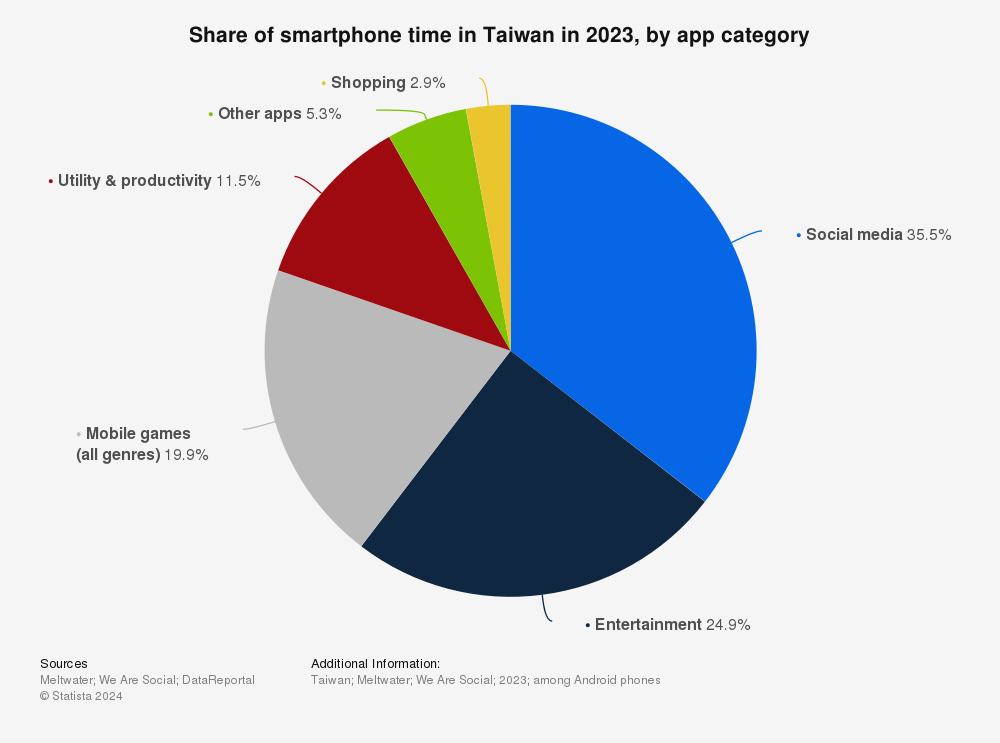
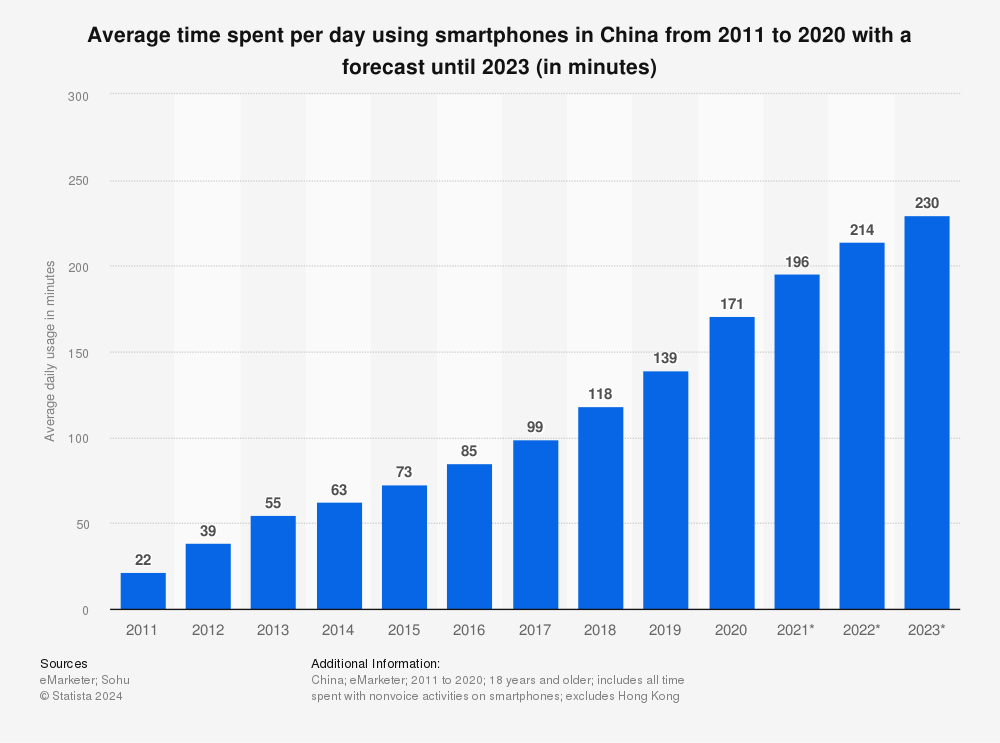
    In 2024 it is more evident than ever that we live in a world of noise and distraction, channeled to us through networked smart devices – particularly our smartphones. All it takes is one look at any public or even private space to realize that the default action for a majority of the population in developed countries is to use their phones every time they are not actively engaged with a specific activity. Now, smartphone use can mean a lot of different things. Often times we use our devices for communication or learning. However, in reality, most time on smartphones is spent on ‘entertainment’ and ‘social media’ – and everyone who has ever seen a stranger use their phone knows that that means mindless doom scrolling. Are dumbphones a possible solution?

    It’s a natural reaction when looking at these or one’s personal app usage statistics to feel a sense of alarm. Many people report that the time they spent on social media feels wasted or turns into a complete blur. No one remembers the hundreds of TikToks or YouTube Shorts they scroll through every day. Thus, no long or short term value is generated from these activities. This is what has caused new communities and movements to appear and grow since the late phases of the pandemic. They are united by the desire to disconnect and regain control over their time. One of them is the dumbphone movement – a growing group of people who have chosen to replace their smartphones altogether1. Instead they utilize simpler devices with fewer capabilities, often no or very limited app support, bad cameras and small screens.

    Understanding the Dumbphone Resurgence

    The dumbphone movement is not just about nostalgia for flip phones and early-2000s tech. It’s a deliberate choice to step away from the constant exposure to smartphones, which have become integral to our lives. They are also notorious for fostering habits like doomscrolling, social media addiction, and endless notifications.

    The resurgence of dumbphones is driven by a desire for simplicity, intentional living, and a return to a time when our devices served specific, limited functions rather than acting as constant companions. A dumbphone user forces themself to compromise on or forsake many of the functions any smartphone comes with. Taking pictures will require deliberately taking a camera. Music may require a dedicated MP3-player or at the very least a media collection saved on the phone. Instead of “Tap to Pay” they will use cash or physical cards. The goal of disconnection is achieved by brute force. A dumbphone user doesn’t have to deal with hundreds of notifications – there are none other than messages or calls.

    Dumbphones often also come with some inherent advantages. Their simple hardware makes them rugged and cheap. Battery life is often better, and their lack of functions may make them easier to use. These phones may also be somewhat more secure and private due to their smaller attack surface, depending on the exact phones you are comparing and their usage. Social media is typically funded by data harvesting which straight up isn’t as much of a concern on a phone that doesn’t support social media apps. However, dumb phones are typically proprietary in their software (as are most smartphones), so the manufacturer may still be employing tracking.

    A Better Solution than Dumbphones?

    While the appeal of dumbphones is understandable, the movement seems like a bit of a knee-jerk reaction that stems from a lack of technical understanding of smartphones and computers in general. Smartphones are not inherently harmful; they are powerful tools when used mindfully and/or correctly. The issue lies in our habits and the ways in which we allow technology to dominate our lives. It’s unfair to blame people for becoming addicted to these technologies. They were designed by expert psychologists to be as addictive as possible. However, by taking a smart and defensive stance, we can benefit from smartphones while minimizing their risks. Therefore, rather than discarding modern phone technology altogether, a more balanced approach might involve learning to use our smartphones in a way that aligns with minimalist principles or is based on a better understanding of that technology.2
    That means first analyzing what you are currently doing on your phone and which part of your phone or phone usage is problematic for you. Next, one should define a specific goal, such as cutting screen time or social media usage. And then, rather than choosing the nuclear option of getting rid of the entire device, one should first try mindfulness or software solutions to achieve one’s goals. For instance, simply uninstalling apps, disabling certain notifications, changing screen settings such as using monochrome filters, or using parental controls or tools like Digital Wellbeing should help most people achieve their goals. If enhanced privacy and security are your goals, you might consider getting rid of or sandboxing Google Play Services. For that consider using GrapheneOS or LineageOS.

    My approach

    I have personally chosen this philosophy and approach. It has allowed me to minimize my time spent on social media to near zero without missing out on any core smartphone features. GrapheneOS offers significantly more security than stock smartphones and most dumbphones with proprietary firmware.

    The Drawbacks of Going Dumb

    But why are dumbphones not the best solution for phone addiction and digital overload? If they achieve the main goal, what’s wrong with using them?

    Well first of all it’s obvious that one will be missing out on a lot of modern technology in the process. Much of that technology can’t be shrugged off as simply a convenience. One will lose access to an excellent camera right in their pocket. Any media consumption will be compromised, even if it would not fall into the category of mindless consumption. Communication will get harder. Some people choose to resort to unencrypted text messages. Many pick what I would call a compromised dumbphone – a non-smartphone that still comes with WhatsApp & Co..3 These often will also have preinstalled Facebook and web browser apps. Still others choose smartphones with unconventional form factors reminiscent of older phones like flip phones.

    These, at least to me, are not true dumbphone users, but they often give similar reasons for using such phones as actual dumbphone users do. They claim that these form factors, with their smaller screens helps them lower their phone usage and feed their nostalgic desire for a more tactile experience. Their attitude is closer to where I would suggest someone go in order to achieve a better digital lifestyle, but the same can be achieved with a regular smartphone as well.4

    Compromises

    Dumbphone users still rely on many of the same technologies as smartphone users, but they must compensate for their device’s lack of capabilities. That is, at the very least, inconvenient. Instead of managing a single device, they now need to keep multiple devices charged and on hand or risk missing out. Dedicated media players, a camera, a navigation device, or an e-reader are just a few such examples. This complexity can lead to higher costs, as purchasing and maintaining multiple devices can be more expensive than one smartphone.

    While some may view having fewer capabilities as an advantage, I see it as a limitation. Having options and choosing not to use them is more flexible than not having those options at all. Additionally, using a smartphone doesn’t prevent someone from also using other dedicated devices. Interestingly, many dumbphone users on platforms like YouTube still own and use smartphones567, suggesting that their chosen solution is more complicated than necessary. Often, their problem could be solved with software adjustments or by selecting a different smartphone that better aligns with their needs.

    The Nostalgia Factor behind Dumbphones

    Many people apparently also prefer dumbphones for their nostalgic and tactile feel. This appears to be the case, as seen in communities like r/dumbphones. Their lack of capability is sometimes used as a social justification to engage in other nostalgic but irrational consumption. Some such examples: Using a dedicated camera when one normally wouldn’t or using an iPod or Walkman for listening to music. In my opinion, as an adult one should be able to be irrational in a conscious manner. That means it’s fine for you to use a smartphone and a walkman at the same time just because you feel like it or you like fidgeting with physical buttons. Many dumbphone users appear to make their quirky choice of phone a part of their identity.

    The Dumbphone Economy

    But let’s say you have chosen the dumbphone life: Please do not buy one of these new fangled modern “premium” dumbphones, such as the Punkt MP02. This phone, as well as many others in this category are leaning heavily on digital detoxing and minimalism as part of their marketing. They charge an exorbitant premium with no inherent benefit. They are trying to capitalize on a movement that inherently is at least somewhat anti-consumerism. Brands like these try to monetize and milk this current trend. Instead, I would steer you toward buying any old used phone or a cheap new dumbphone, like the modern Nokias. They cost a fraction of the aforementioned premium options and do exactly the same things. Buying more new and expensive devices seems like it goes against the spirit of the movement to some degree.

    Finding the Balance

    The resurgence of dumbphones reflects a growing desire for simplicity and intentionality in a world overwhelmed by digital distractions. While these devices offer a straightforward escape from the pitfalls of modern smartphone use, it’s important to recognize that there are more targeted alternative solutions. A more balanced approach that involves mindful usage, setting boundaries, and embracing some of the useful aspects of modern technology is probably a better fit for most people. Either way, recognizing the numerous issues behind smartphone overuse is very important. Therefore, the dumbphone movement is on the right track, even if I disagree with their conclusion.

    Sources

    1. https://www.br.de/nachrichten/netzwelt/dumbphone-liegt-im-trend-smartphone-nein-danke,UBzUR9f ↩︎
    2. https://www.heise.de/news/So-macht-dein-Smartphone-weniger-suechtig-9807339.html ↩︎
    3. https://www.reddit.com/r/dumbphones/comments/18xm09m/state_of_the_dumbphone_2024_read_this_first/ ↩︎
    4. https://www.youtube.com/watch?v=2OybGwwGc20 ↩︎
    5. https://www.youtube.com/watch?v=ECNdiqISRl4 ↩︎
    6. https://www.youtube.com/watch?v=IwUcSMfBilY ↩︎
    7. https://www.youtube.com/watch?v=-Ylmmn_8eG8 ↩︎
  • Replacing the Nvidia SHIELD TV Pro with FOSS Android TV

    Replacing the Nvidia SHIELD TV Pro with FOSS Android TV

    It’s no secret that Android Smart TVs suck, or rather that their smart features are poorly implemented. They are usually powered by bottom of the barrel hardware. They are stuffed full of proprietary software. And they stop receiving updates and security patches long before the lifetime of the actual TV is over.

    That more or less forces a security conscious user to air gap and replace them, if they still wish to use basic smart features on their TV. That’s what I did to my 5 year old Philips OLED and I decided on the Nvidia SHIELD TV Pro, based on positive reviews online. My overall experience has been positive: Performance is good and I’m getting more updates. It also comes with better features like a good remote and AI upscaling.

    Alas it’s still liable to be discontinued well before I plan on replacing my actual TV, and before the hardware itself is obsolete. Also the OS is still beholden to the manufacturer and not the owner. Google has started implementing more and more aggressive ads right on the home screen. The entire OS sends telemetry to various vendors. And of course, you can never even know what it’s actually even doing: It runs constantly in a standby mode, the code can’t be audited by the user and it even has a microphone in the remote.

    A better, more long-term solution

    My criteria are:

    • Needs to be able to run 4k HDR at high 100+ mbit/s bitrates smoothly.
    • Needs to be able to stream comfortably from Jellyfin.
    • No spying.
    • Software should remain updatable for at least 3 more years.
    • Youtube should work.
    • Some kind of remote control.
    • Affordable.
    • Similarly low power draw.

    My first thought was Kodi, likely on a Raspberry Pi, or alternatively a mini multimedia PC. Some research revealed that a Pi 5 could likely barely handle my performance requirements, but not perfectly either. Cost wise both options could be had for under 100€, and both would have excellent long term viability. However, why pay any money, if I already have possible solution sitting in my drawer: An unused Jetson Nano 4GB, running on a Tegra X1 SoC similar to my Shield TV Pro and a Nintendo Switch with its standout feature being a fairly competent GPU.

    Nvidia pretty much abandoned the Jetson Nano. Up-to-date Linux options are limited, and the available kernels are very outdated. The CUDA SDK that is required for programming its GPU doesn’t support it anymore. OpenCL on the GPU doesn’t work either. With these factors in mind I didn’t have much use for it anymore – until now. Luckily there is a port of Android TV, specifically LineageOS available and up-to-date, so decided to install it.

    Installing Android TV

    I decided on a plain install without GApps. For my network connection I used Ethernet, though WiFi should work with a dongle, a wired connection should be a bit more reliable and faster. Next, I sideloaded F-Droid with adb and installed the Aurora Store. I installed the YouTube App and the Jellyfin client, Termux, VLC and a web browser. I did all that with a keyboard and mouse connected, but both my TV Remote and my Logitech Harmony Hub phone app worked perfectly out of the box via HDMI CEC.

    Testing

    At first, I noticed HDR being flaky in Jellyfin. It turns out that the auto bitrate adjustment picked a value that was too low for HDR. I set it manually to the highest limit and it has been working fine since. I also had issues with some files stuttering. That I could easily resolve by switching Jellyfin to using libVLC rather than ExoPlayer. Next there were some audio issues, such as muffled sound or none at all for certain video files. I fixed it by changing the settings to always down-mix 5.1 to stereo which is what I’m using anyway. I also enabled bitstreaming DTS.

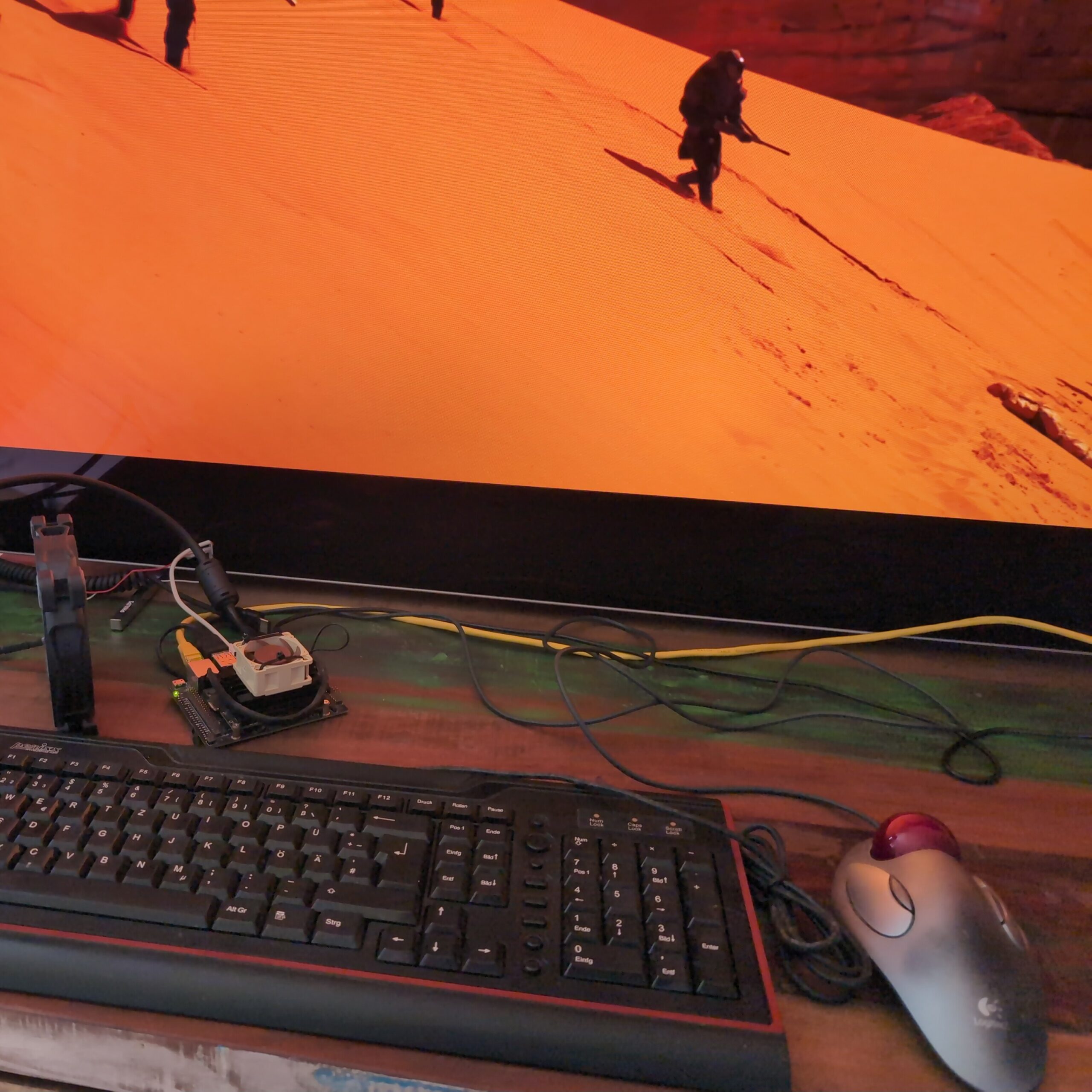
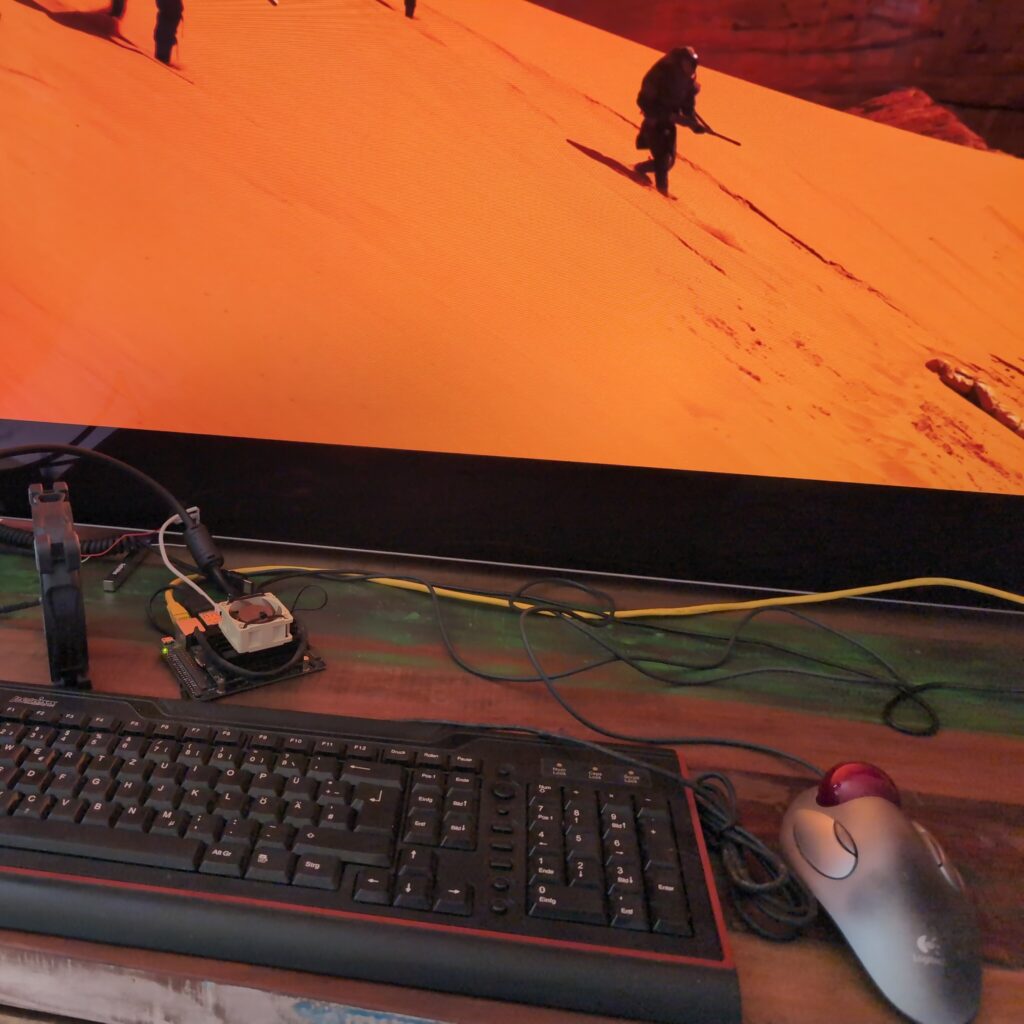
    My test setup playing Dune in 4K HDR.

    Further testing revealed that YouTube still failed to stream HDR. I’ve been unable to find a solution for that as of yet, but this one I can live with. I also noticed that the Fan I had attached to the Jetson didn’t want to spin, so I removed it. This indicated to me that the Board was running in its default, more efficient mode and not the significantly faster MaxP mode. I didn’t quickly find a way of changing that, but since performance is smooth all the way, I don’t feel the need to use more electricity anyway.

    Comparison to SHIELD TV Pro

    You definitely lose some features compared to using a Shield TV Pro, the big ones to me being:

    • AI upscaling (I can live without but it is a loss, maybe some day it will be added to Jellyfin serverside)
    • YouTube HDR (likely fixable)
    • Chromecast (Could be added with GApps, but since YouTube device linking still works the main reason I would want to cast is covered)

    The standby power consumption will also be likely higher, since as of now I haven’t found a way yet to get the Jetson to sleep. Likely Kodi would also have trouble with convenient sleep handling as well, though I didn’t test it. You’ll likely want to hide your Jetson as well, since it just doesn’t look as sexy as a SHIELD.

    What you do gain though is privacy, security and flexibility. I also enjoy having four more USB Ports to charge my controllers.

    Should you get a Jetson Nano instead of a SHIELD for Android TV?

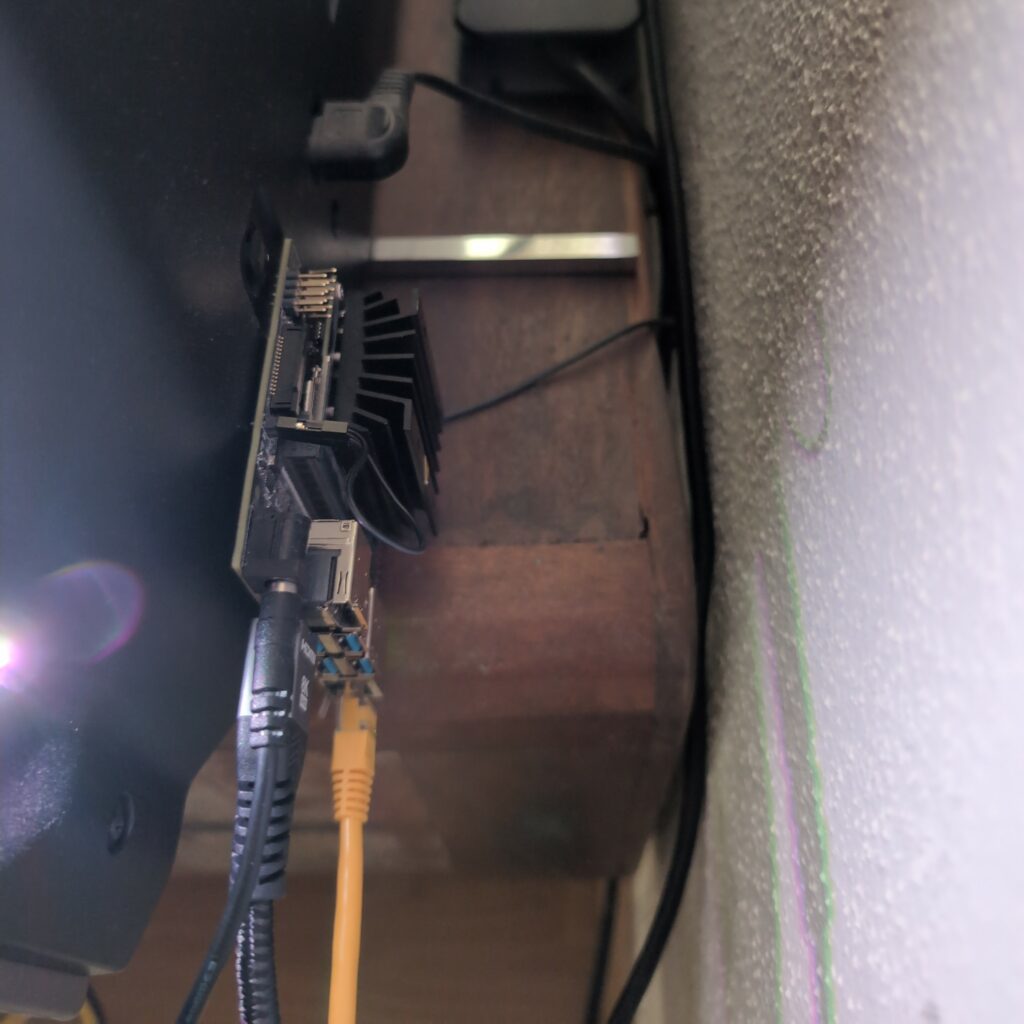
    Its final resting place, glued behind my TV.

    Probably not. If you already have one, this is a great use for it. The entire setup took me a couple of hours, but in the end it works nearly as well as the SHIELD while being way more private and secure. If you don’t already have one though, you should probably do more research and consider a Raspberry Pi 5 or a multimedia mini-PC with Kodi or even Android TV first. While it’s hard for me to say whether they will provide a better experience overall, they will definitely have a longer remaining lifespan due to them being so much more popular.

    2025 Update

    As of 2025 I am still using this setup, however I have since installed a small Noctua fan to the Jetson since it was running fairly hot, and I have partially switched to Findroid to mitigate some HDR streaming issues I was having with other apps.

  • Used Hard Drives are incredibly cheap – use them safely with ZFS

    Used Hard Drives are incredibly cheap – use them safely with ZFS

    In late 2023 we live in an era of super cheap storage. Be it flash based or spinning rust, they can be regularly had for 30€ and 13€ per TB respectively. Just a few years ago you had pick very specific high density (for the time) disks to get under 20€ per TB. This isn’t necessarily practical if you only need moderate amounts of storage but want good redundancy. The true budget option is used magnetic storage, going for well under 3€ per TB. But how can you safely make use of worn, old disks? That’s where ZFS comes into play.

    Used HDD pricing in 2023

    The idea of using smaller used disks with high redundancy comes from the dramatic savings that can be achieved. I have seen several lots of 10-40 disks priced as low as 2.50€/TB. Now, using this many disks at once is somewhat impractical, even with high redundancy and (hot-)spares. But ironically, selling a part of such a lot as individual disks will increase their value, since most people don’t want the hassle of buying this many disks. Although individual disks (of this specific type) can go for similarly low prices, they can also go for up to 15€. Either way you would want to keep some spares.

    Reliability and redundancy with ZFS

    Now the reason why people are reluctant to buy used HDDs is due their limited lifetimes. Being mechanical in nature they will die eventually. Especially these super cheap lots of enterprise disks will have had a hard life with extremely high runtime in data centers. However:

    • These lots usually advertise their disks as 100% health.
    • They are enterprise grade and designed for very high uptime and high reliability
    • HDDs have come a long way. Even these older models are likely to be much more reliable than the ones that caused HDDs’ reputation for high failure rates.

    With that being said you will want to plan for failing disks, data corruption and bit rot. You should do that for any kind of storage, but for used Hard Drives especially. And the best system that gives you both redundancy and corruption resilience at home is ZFS. ZFS is a file system with native support for RAID, or replication of data across multiple disks through parity data. Unlike traditional RAID systems, however it also provides resiliency against bit rot.

    Bit rot is the degradation and corruption of data that can occur on many media. It can have many causes, but basically this phenomenon means that any storage media over time will lose and corrupt data and the only protection against that is parity and a system that can repair data from that parity. Traditional RAID will protect against failing hard disks, but it has no way of knowing which bits may have rotted or not. ZFS does that.

    How does it work?

    There are already many good ZFS tutorials out there, but to keep it theoretical, for very good resilience with used disks you may want to use RAIDZ3, meaning having the capacity of 3 disks as redundancy. If you had two four-port SAS-controllers (which can be had for well under 5€ each) you might have eight disks connected and keep two as cold spares. You could sell off the rest of the lot or keep it for future expansion. The ZFS calculator suggests you would then have 12TB of usable capacity, with cold spares and very high reliability for under 40€ all in. Sounds like a good deal to me.

    ZFS is an enterprise-grade file system can help you build a super reliable home storage solution on a tiny budget.
  • Archiving on physical media for dummies – Part 1 – LTO

    Archiving on physical media for dummies – Part 1 – LTO

    As a tech literate person using a computer and the internet, you already understand the importance of backing up your data. However, backups are not the same as archiving. While backups ensure you have a recent copy of your data to restore from in case of a disaster, archiving is focused on the long-term preservation of information. This archive can serve as an additional layer of assurance that your most valuable files are secure many years down the line, or it can allow you to hoard even trivial data that you might never want to look at ever again without it polluting your actively backed up data – it will always be there for recovery if you change your mind. Another interesting use case might be the creation of a “digital inheritance”. One technology that has been around for decades and can help you with that is LTO:

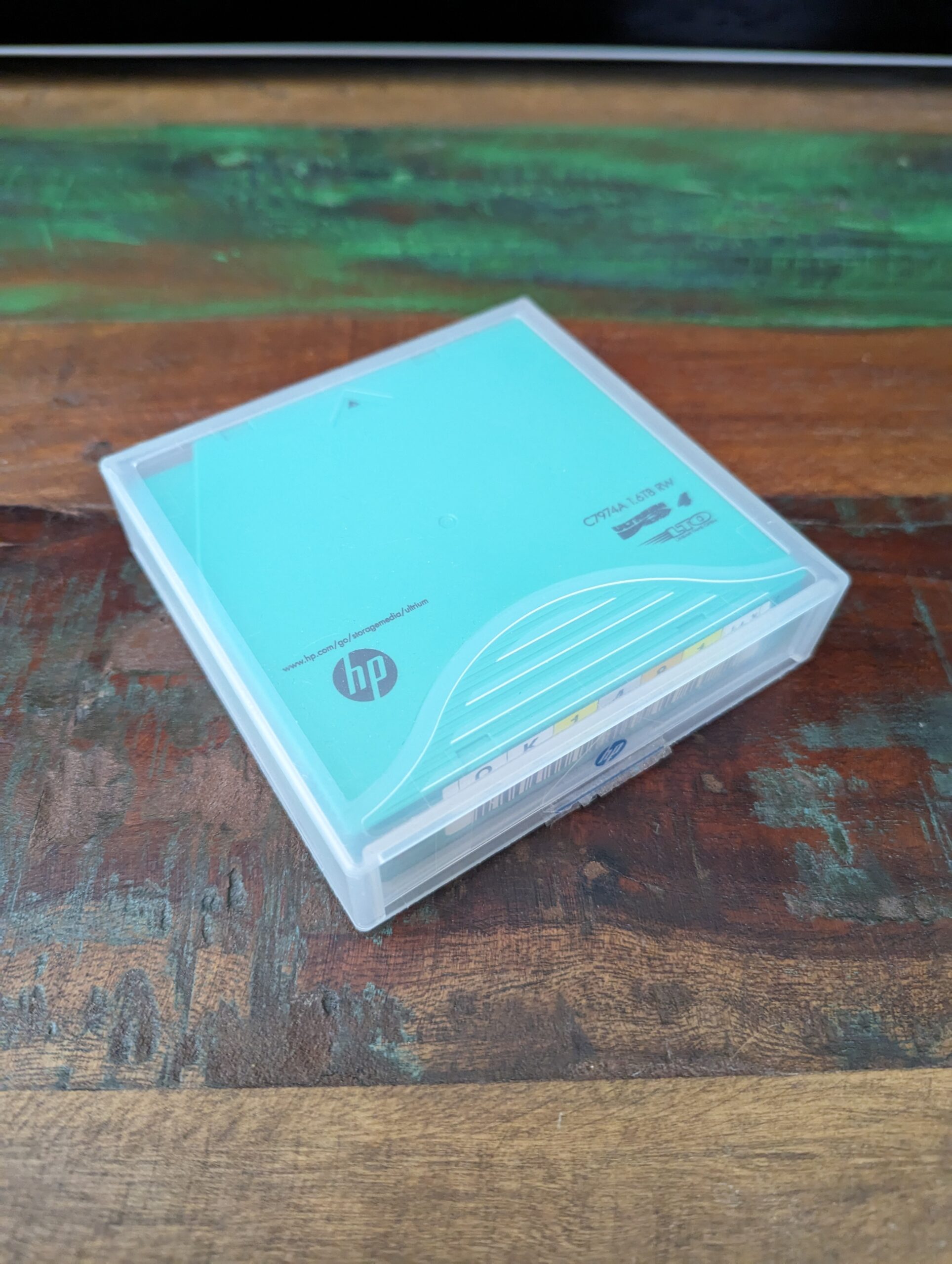
    I have been using LTO (Linear Tape-Open) for archiving large amounts of RAW photos that I deemed worthless, including lots of individual frames from timelapses and astrophotography. I also archived my large music collection when I abandoned audio files in favor of streaming – now that I am partially going back to local files, this archive is coming in very handy.

    What is LTO?

    LTO is a high-capacity, robust and cool looking and sounding tape storage format. It has been around since the 1990s in, as of today, nine generations. With each of these generations, capacities and speeds increased and features were added. LTO is particularly suitable for archiving large amounts of personal data due to its longevity, reliability, and cost-effectiveness.

    LTO is also shockingly slow and the hardware can be a little unreliable. Because the drives typically use some form of SAS and the different generations of tape cartridges are each only compatible with certain generations of drives, this can make implementing an LTO archiving system a little intimidating for hobbyists. Luckily, the accompanying Linux software stack is robust and easy to use.

    Why use LTO for Archiving as a Hobbyist?

    If you are still reading this you are probably some kind of data hoarder like myself. LTO can, but should not be part of your regular backup strategy (3-2-1 rule). Instead it should be considered best as a type of cold storage – an extension of your storage capacity to be used for rarely accessed data. For that use case, it offers a number of advantages over other media:

    1. Longevity: LTO tapes have a shelf life of up to 30 years, which is significantly longer than traditional hard drives or solid-state drives, as well as many optical media. This makes LTO a reliable option for long-term storage.
    2. Capacity: LTO tapes offer high storage capacities, with the latest LTO-9 version offering up to 18 TB of uncompressed storage and up to 45 TB with compression. This capacity allows you to archive large amounts of data on a single tape. However, these later standards require very expensive equipment to utilize which is probably out of reach for a more casual home use case – more about the various generations below.
    3. Scalability and cost effectiveness: Due to the cost of entry, LTO is only worth getting into if you plan fill a certain number of tapes, however, if you do get beyond that threshold, it is very cheap to get additional capacity just by buying more tape cartridges.
    4. Coolness: Using LTO at home is a good conversation starter and the whirring of the drive is proven* to have positive impacts on your health, such as lowering of blood pressure and improving your patience.

    *not really

    Which LTO Generation is the sweet spot?

    I got into LTO-4 a number of years ago. At the time it offered the highest cost efficiency for the capacity I was aiming for. Calculating the best option depends on a number of factors, but the TL;DR is that in 2023 the LTO-5 generation is probably the way to go. Older generations may make more sense if you know you only want to store smaller amounts of data. Meanwhile, newer generations are just too expensive to get into right now. Note, that if your desired capacity is very low, there are other media that may prove more efficient for archiving, such as DVD-RAM.

    TCO Calculation

    (DAmount / DTapeCapacity) * CTape + CDrive + CController + CCable = TCO

    So if you are interested in archiving 16TB of data you are looking at a TCO for LTO-4 of 10*12€ per Tape (assuming the compressed capacity of 1.6TB per tape and current prices on ebay) + 70€ for the drive and around 30€ for controller plus cables = 220€.

    For LTO-5 a typical price per tape might be 17€ and you only need 6 of them. The drive might cost 160€. So that’s a total of 292€. I would probably reach for the newer LTO-5 in this case.

    Note that the prices for the drives vary wildly. On eBay LTO-5 drives can go for as low as 100€ and as high as 600€. I recommend watching the market and bidding until you get a cheap one.

    One final note on LTO generations: Keep in mind that there are limits on the compatibility between different generations. For example, an LTO-5 drive can only read and write LTO-4 and LTO-5 tapes, as well as read LTO-3 tapes. This can make later upgrading complicated and more costly, so you when in doubt consider a newer generation.

    Definitely study the generations and the compatibility notes on Wikipedia first.

    Getting Started with LTO on Linux

    Now this is the fun part. To set up you tape drive simply connect your SAS controller and drive and push in a tape. It should automatically be recognized and available in /dev:

    andreas@pennyworth:~$ ls -l /dev/tape/by-id/
    total 0
    lrwxrwxrwx 1 root root  9 Mar 12 17:34 scsi-3500110a0014d6b46 -> ../../st0
    lrwxrwxrwx 1 root root 10 Mar 12 17:34 scsi-3500110a0014d6b46-nst -> ../../nst0
    lrwxrwxrwx 1 root root  9 Mar 12 17:34 scsi-HU1132HUE8 -> ../../st0
    lrwxrwxrwx 1 root root 10 Mar 12 17:34 scsi-HU1132HUE8-nst -> ../../nst0

    Use the nst device if you do not want your drive to rewind the tape automatically after each file transfer. This will save you a lot of time if you plan on saving more than one file in one sitting. Rewinding can take a lot of time. To do it manually, you can eject the tape using the drive’s eject button or you can use:

    root@pennyworth:~# mt -f /dev/nst0 rewind

    Because the tape is linear, you’ll want to use tar (tape archive, that’s where the name comes from) to archive your files into a large block so the drive doesn’t have to seek – which it really can’t anyway.

    Make sure you are using mt-st and not the often preinstalled GNU mt command. GNU tar does not allow you to enable compression which you probably want to do. On Debian you might run:

    root@pennyworth:~# apt install mt-st
    root@pennyworth:~# mt -f /dev/st0 compression 1

    Finally to save and retrieve tars from your tape you can use:

    root@pennyworth:~# tar --create --file=/dev/st0 /root/testfile
    root@pennyworth:~# tar -xzf /dev/st0 -C /tmp/output

    There’s a lot more to look into such as hardware encryption, but this should cover the basic use case of archiving a directory and retrieving it.

    A note on drive reliability

    I have had two SAS controllers failing as well as on drive destroying itself and taking a tape with it. Researching online, it appears that I was particularly unlucky, although particularly drive failures can occur. Keep in mind that the drives you might come into contact with may be 10-20 years old and may have had a hard life. An external drive is probably less likely to have a lot of wear, compared to one that was in use in a tape library.

    Handling tapes

    Since we are talking about archiving data, you’ll want to make sure you store your tapes properly for maximum longevity:

    1. Store tapes in a cool, dry, and dust-free environment to prevent damage and degradation.
    2. Use the unique codes on the label of each tape to document where you stored which data.
    3. Regularly check the health of your tapes using:
    mt -f /dev/nst0 status

    Is it for you?

    Ultimately, whether LTO is a media format worth using as a hobbyist is very subjective. Even data hoarders won’t usually have that much use for this class of medium. You probably also need to want to get into this mildly unusual technology for the fun of it. With that being said, it can be rewarding and efficient for a certain audience of people. I certainly enjoy using it.

  • Ultra Budget NAS build 2019: 16TB and more speed for 350€

    This is an update to last year’s ultra budget NAS build. Since I had mentioned “2018” in the title, I am now obligated to make a “2019” update.

    So what has changed since then?
    Firstly, the prices for internal HDDs haven’t fallen. The Intenso drives I used last year are still some of the best in terms of price per capacity. Secondly, the Raspberry Pi 4 was released with much faster processing and networking speeds, 2x USB 3.0 and the option for 4GB of memory. All of these upgrades make it perfect for a budget NAS build, in fact, this is so much more powerful that you may want use it as a fully fledged home server for some tasks.

    Components

    As you can see, I decided to use two external HDDs instead of four internal ones with separate cases. This year, this makes more sense, because they offer much storage for their price, especially taking the included cases into account. Furthermore, these already support USB 3.0; perfect for the upgrade to the Pi 4 which has exactly two USB 3.0 ports. One could consider having only two disks to be an advantage or a disadvantage, though. You won’t be able to use RAID 5, but if you were going to use RAID 1 anyway, then having fewer disks will be more reliable and use less power and space.

    The Pi 4 upgrade is a no-brainer. It should be much, much faster for NAS applications. You could use one with less RAM, but having the extra capacity for caching or other home server applications is probably worth it for future proofing. While I didn’t add separate cooling last year, this year it is really necessary. While cheaper options may be possible, this will also give you a nice and sturdy metal case. The official Pi 4 power supply is one of the cheapest that are available and should be very reliable. Finally, microSDs have dropped even further in price: This year we can have 64GB, giving you more headroom in general.

    While I wish could have achieved 300€ again this year, that number just didn’t make sense this time around and the added performance and capacity are definitely worth it. This is a worthy Ultra Budget NAS build!

  • Ultra Budget NAS build 2018: 12TB for 300€

    With the release of the new Raspberry Pi 3 Model B+ and me still looking to build a NAS (Network attached storage or home server), this ultra budget build was something I came up with:

    2019 Update: Ultra Budget NAS Build 2019

    Components for the Budget NAS build 2018

    • 1x Raspberry Pi 3 Modell B+ ~35€
    • 4x Cremax Icy Dock MB559UEA-1SB ~8€ each
    • 4x Intenso SATA HDD 6513113 ~60€ each
    • 1x SODIAL Raspberry Pi case ~2€
    • 1x Official Raspberry Pi 2.5A micro USB power supply ~8€
    • 1x Kingston 16 GB micro SDHC card ~3€

    Geizhals wishlist

    Some additional cabling may be required.

    Possible options

    • You can technically omit the case, an old phone charger with enough power should suffice as the power supply. A few more cents could be saved by going for an even smaller SD card.
    • While at the time of this writing, these 3TB Intenso HDDs offer the best bang for your buck, you don’t have to get four if you don’t need 12TB. Currently picking anything less than 3TB makes little sense, unless you have to save every last bit of money: The Toshiba DT01ACA 1TB HDD for 35€ each is the best 1TB option.
    • You should expect the USB bus to be the limiting factor here in terms of performance. While the Pi only supports USB 2.0, you might want to consider getting USB 3.0 cases instead, so you can load the initial data directly from your PC faster. The LogiLink UA0107 costs about 15€ and should be faster than the Icy Dock.

    Definitely pick the new Pi 3B+. Because its Ethernet connection doesn’t use USB anymore, it should be much faster than previous models for this application.

    Since these HDDs are not meant for NAS operation, you should probably set up a RAID 5 or 1 just to be safe.

    For software you could go with just Raspbian or the more specialized OpenMediaVault.

    Update: I only noticed just now, but it seems I’m one day late for World Backup Day. Shoot.