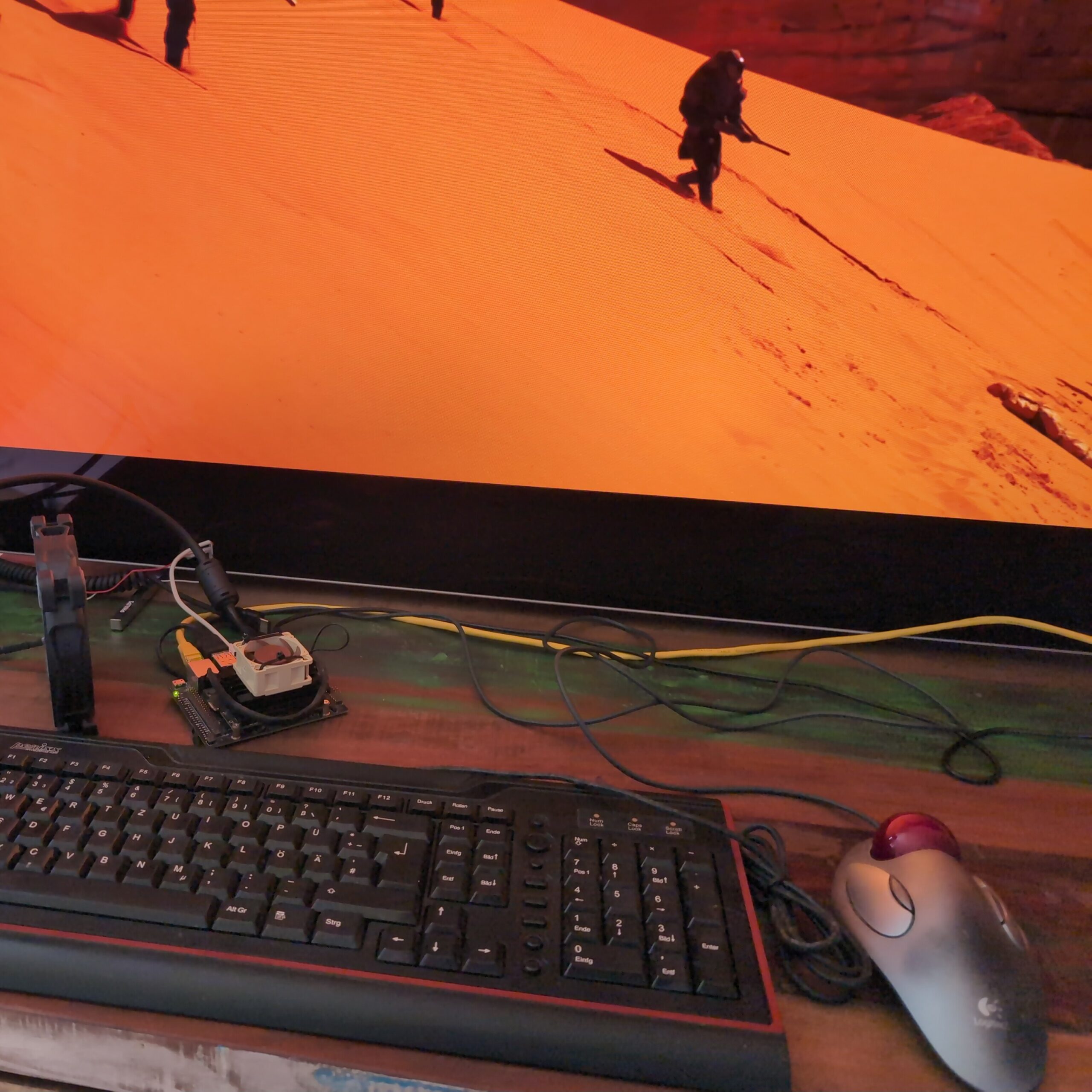
After using an Nvidia Jetson Nano 4GB with LineageOS for a while as my Open Source Android TV box I noticed some issues with HDR streaming at high bitrates. Despite the serverside encoding working fine, the streams sometimes were unstable, breaking off after a few seconds. I decided to try direct streaming with VLC over SMB as well as with Kodi, but both of them had different issues with correctly displaying HDR. I ended up solving the issue using Findroid, an alternative Jellyfin client for Android. Can it replace the Jellyfin App on a TV?
Easy setup
Findroid is available on F-Droid, so the install was unproblematic on my degoogled Android box. On my phone running Graphene OS, I received an error toast on F-Droid, but it did install fine. It is also available on Google Play though, as well as on GitHub. The setup was fairly easy as well, just log in, no extra steps needed. It also supports the Jellyfin “Quick Connect” feature. That means that you won’t have to type the password manually with the on-screen or separately attached keyboard which is nice especially for TV.
Usability issues on TV
With my moderately sized Video collection, browsing performance seems to be similar to the Jellyfin TV app. Opening a collection is fairly quick. There are a few minor visual glitches I noticed though. However the biggest usability issue by far is the remote control when using it on TV: The directional keys often do not lead to the elements in the UI that you would expect. As is not uncommon for material design, the element you are currently highlighting is not always obvious. Clearly Findroid is not optimized for TV use yet, as the developer mentions on the GitHub README. It is however a planned feature, and the app is currently undergoing a rewrite, so there is hope.
With that being said, the interface is structured logically and shows all the information you would really need. It integrates well with Jellyfin’s features, like keeping track of which episodes you have watched. Searching and sorting work fine, and despite this app being optimized for mobile, it visually already works quite well on TV. I ended up using a mouse cursor to mitigate the usability issues, and with that it’s definitely usable. On mobile, with touch input, the usability issues are nonexistent.
Findroid explicitly only supports direct streaming – no transcoding. It somehow also does that better than any other app I have tried. In my case that means that there is a short few seconds of buffering when opening a very large video file, but after that, it streams perfectly, no stuttering or issues with HDR and of course with perfect quality.
Findroid: Conclusion
So is this the better Jellyfin App? Not really, but I’ll still be using it on my TV.
Which one is better depends on the situation. If you have access to a mouse, or a similar solution, Findroid is technically better for local streaming. That is especially true, if you are having issues with HDR for instance. It works even better on phones.
However, when streaming over the internet or a VPN, you’ll probably want transcoding, and that is where you will want to use the official app. If you don’t have any issues with that app or don’t need HDR, it will also work better on TVs in general.
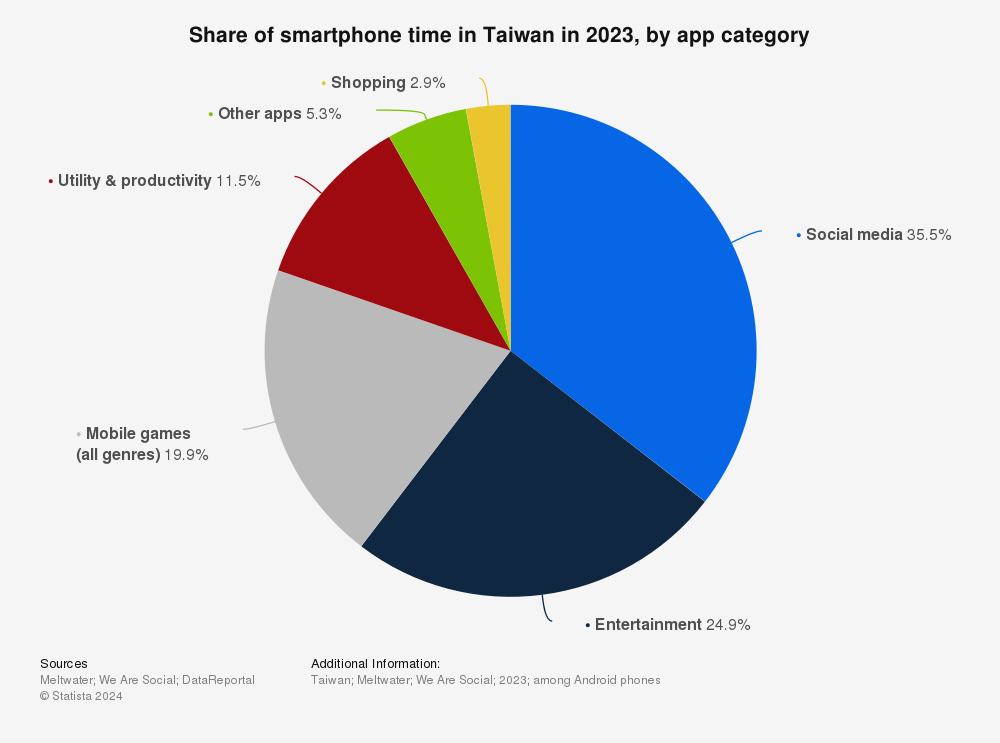
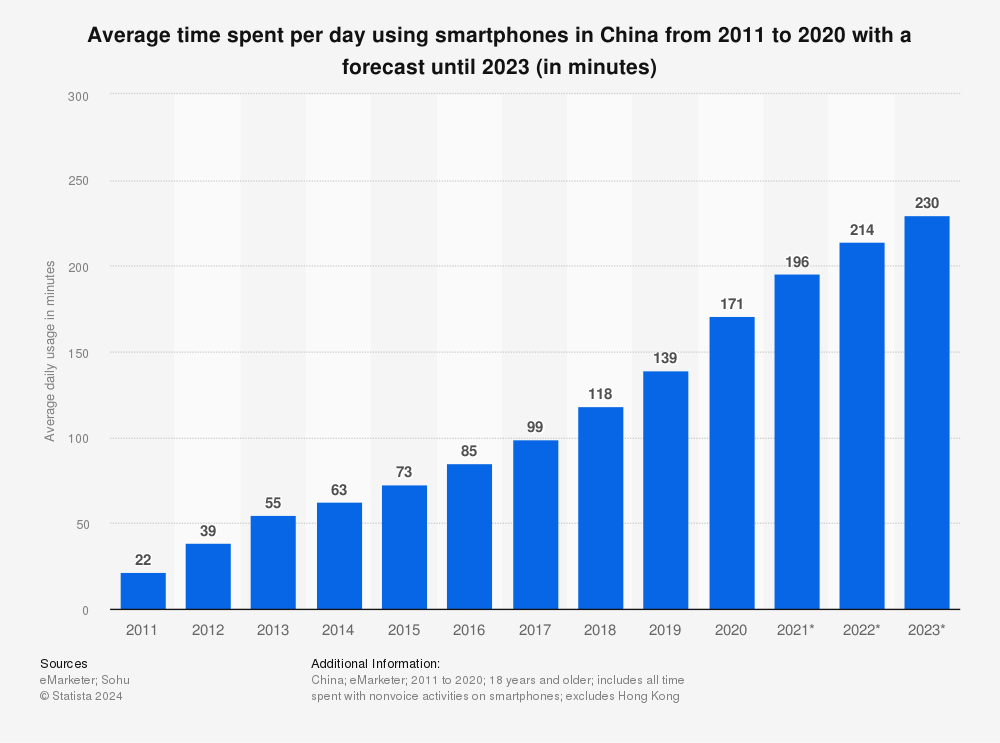
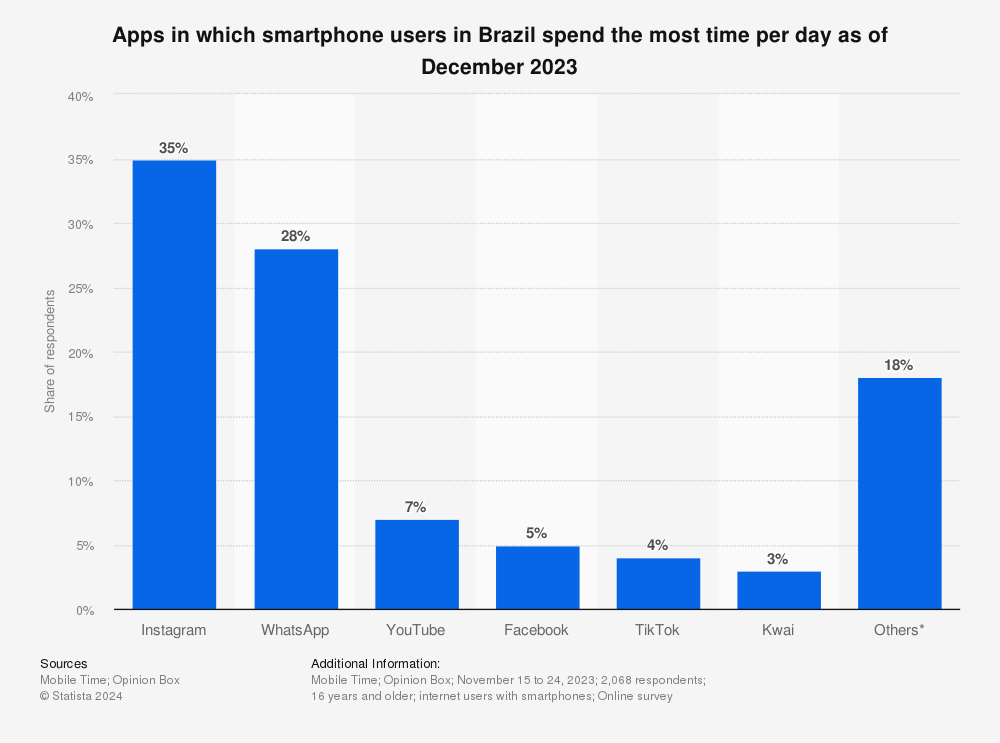
In 2024 it is more evident than ever that we live in a world of noise and distraction, channeled to us through networked smart devices – particularly our smartphones. All it takes is one look at any public or even private space to realize that the default action for a majority of the population in developed countries is to use their phones every time they are not actively engaged with a specific activity. Now, smartphone use can mean a lot of different things. Often times we use our devices for communication or learning. However, in reality, most time on smartphones is spent on ‘entertainment’ and ‘social media’ – and everyone who has ever seen a stranger use their phone knows that that means mindless doom scrolling. Are dumbphones a possible solution?
Share of smartphone time in TaiwanAverage time spent per day using smartphones in ChinaApps in which smartphone users in Brazil spend the most time per day
It’s a natural reaction when looking at these or one’s personal app usage statistics to feel a sense of alarm. Many people report that the time they spent on social media feels wasted or turns into a complete blur. No one remembers the hundreds of TikToks or YouTube Shorts they scroll through every day. Thus, no long or short term value is generated from these activities. This is what has caused new communities and movements to appear and grow since the late phases of the pandemic. They are united by the desire to disconnect and regain control over their time. One of them is the dumbphone movement – a growing group of people who have chosen to replace their smartphones altogether1. Instead they utilize simpler devices with fewer capabilities, often no or very limited app support, bad cameras and small screens.
Understanding the Dumbphone Resurgence
The dumbphone movement is not just about nostalgia for flip phones and early-2000s tech. It’s a deliberate choice to step away from the constant exposure to smartphones, which have become integral to our lives. They are also notorious for fostering habits like doomscrolling, social media addiction, and endless notifications.
The resurgence of dumbphones is driven by a desire for simplicity, intentional living, and a return to a time when our devices served specific, limited functions rather than acting as constant companions. A dumbphone user forces themself to compromise on or forsake many of the functions any smartphone comes with. Taking pictures will require deliberately taking a camera. Music may require a dedicated MP3-player or at the very least a media collection saved on the phone. Instead of “Tap to Pay” they will use cash or physical cards. The goal of disconnection is achieved by brute force. A dumbphone user doesn’t have to deal with hundreds of notifications – there are none other than messages or calls.
Dumbphones often also come with some inherent advantages. Their simple hardware makes them rugged and cheap. Battery life is often better, and their lack of functions may make them easier to use. These phones may also be somewhat more secure and private due to their smaller attack surface, depending on the exact phones you are comparing and their usage. Social media is typically funded by data harvesting which straight up isn’t as much of a concern on a phone that doesn’t support social media apps. However, dumb phones are typically proprietary in their software (as are most smartphones), so the manufacturer may still be employing tracking.
A Better Solution than Dumbphones?
While the appeal of dumbphones is understandable, the movement seems like a bit of a knee-jerk reaction that stems from a lack of technical understanding of smartphones and computers in general. Smartphones are not inherently harmful; they are powerful tools when used mindfully and/or correctly. The issue lies in our habits and the ways in which we allow technology to dominate our lives. It’s unfair to blame people for becoming addicted to these technologies. They were designed by expert psychologists to be as addictive as possible. However, by taking a smart and defensive stance, we can benefit from smartphones while minimizing their risks. Therefore, rather than discarding modern phone technology altogether, a more balanced approach might involve learning to use our smartphones in a way that aligns with minimalist principles or is based on a better understanding of that technology.2 That means first analyzing what you are currently doing on your phone and which part of your phone or phone usage is problematic for you. Next, one should define a specific goal, such as cutting screen time or social media usage. And then, rather than choosing the nuclear option of getting rid of the entire device, one should first try mindfulness or software solutions to achieve one’s goals. For instance, simply uninstalling apps, disabling certain notifications, changing screen settings such as using monochrome filters, or using parental controls or tools like Digital Wellbeing should help most people achieve their goals. If enhanced privacy and security are your goals, you might consider getting rid of or sandboxing Google Play Services. For that consider using GrapheneOS or LineageOS.
My approach
I have personally chosen this philosophy and approach. It has allowed me to minimize my time spent on social media to near zero without missing out on any core smartphone features. GrapheneOS offers significantly more security than stock smartphones and most dumbphones with proprietary firmware.
The Drawbacks of Going Dumb
But why are dumbphones not the best solution for phone addiction and digital overload? If they achieve the main goal, what’s wrong with using them?
Well first of all it’s obvious that one will be missing out on a lot of modern technology in the process. Much of that technology can’t be shrugged off as simply a convenience. One will lose access to an excellent camera right in their pocket. Any media consumption will be compromised, even if it would not fall into the category of mindless consumption. Communication will get harder. Some people choose to resort to unencrypted text messages. Many pick what I would call a compromised dumbphone – a non-smartphone that still comes with WhatsApp & Co..3 These often will also have preinstalled Facebook and web browser apps. Still others choose smartphones with unconventional form factors reminiscent of older phones like flip phones.
These, at least to me, are not true dumbphone users, but they often give similar reasons for using such phones as actual dumbphone users do. They claim that these form factors, with their smaller screens helps them lower their phone usage and feed their nostalgic desire for a more tactile experience. Their attitude is closer to where I would suggest someone go in order to achieve a better digital lifestyle, but the same can be achieved with a regular smartphone as well.4
Compromises
Dumbphone users still rely on many of the same technologies as smartphone users, but they must compensate for their device’s lack of capabilities. That is, at the very least, inconvenient. Instead of managing a single device, they now need to keep multiple devices charged and on hand or risk missing out. Dedicated media players, a camera, a navigation device, or an e-reader are just a few such examples. This complexity can lead to higher costs, as purchasing and maintaining multiple devices can be more expensive than one smartphone.
While some may view having fewer capabilities as an advantage, I see it as a limitation. Having options and choosing not to use them is more flexible than not having those options at all. Additionally, using a smartphone doesn’t prevent someone from also using other dedicated devices. Interestingly, many dumbphone users on platforms like YouTube still own and use smartphones567, suggesting that their chosen solution is more complicated than necessary. Often, their problem could be solved with software adjustments or by selecting a different smartphone that better aligns with their needs.
The Nostalgia Factor behind Dumbphones
Many people apparently also prefer dumbphones for their nostalgic and tactile feel. This appears to be the case, as seen in communities like r/dumbphones. Their lack of capability is sometimes used as a social justification to engage in other nostalgic but irrational consumption. Some such examples: Using a dedicated camera when one normally wouldn’t or using an iPod or Walkman for listening to music. In my opinion, as an adult one should be able to be irrational in a conscious manner. That means it’s fine for you to use a smartphone and a walkman at the same time just because you feel like it or you like fidgeting with physical buttons. Many dumbphone users appear to make their quirky choice of phone a part of their identity.
The Dumbphone Economy
But let’s say you have chosen the dumbphone life: Please do not buy one of these new fangled modern “premium” dumbphones, such as the Punkt MP02. This phone, as well as many others in this category are leaning heavily on digital detoxing and minimalism as part of their marketing. They charge an exorbitant premium with no inherent benefit. They are trying to capitalize on a movement that inherently is at least somewhat anti-consumerism. Brands like these try to monetize and milk this current trend. Instead, I would steer you toward buying any old used phone or a cheap new dumbphone, like the modern Nokias. They cost a fraction of the aforementioned premium options and do exactly the same things. Buying more new and expensive devices seems like it goes against the spirit of the movement to some degree.
Finding the Balance
The resurgence of dumbphones reflects a growing desire for simplicity and intentionality in a world overwhelmed by digital distractions. While these devices offer a straightforward escape from the pitfalls of modern smartphone use, it’s important to recognize that there are more targeted alternative solutions. A more balanced approach that involves mindful usage, setting boundaries, and embracing some of the useful aspects of modern technology is probably a better fit for most people. Either way, recognizing the numerous issues behind smartphone overuse is very important. Therefore, the dumbphone movement is on the right track, even if I disagree with their conclusion.
It’s no secret that Android Smart TVs suck, or rather that their smart features are poorly implemented. They are usually powered by bottom of the barrel hardware. They are stuffed full of proprietary software. And they stop receiving updates and security patches long before the lifetime of the actual TV is over.
That more or less forces a security conscious user to air gap and replace them, if they still wish to use basic smart features on their TV. That’s what I did to my 5 year old Philips OLED and I decided on the Nvidia SHIELD TV Pro, based on positive reviews online. My overall experience has been positive: Performance is good and I’m getting more updates. It also comes with better features like a good remote and AI upscaling.
Alas it’s still liable to be discontinued well before I plan on replacing my actual TV, and before the hardware itself is obsolete. Also the OS is still beholden to the manufacturer and not the owner. Google has started implementing more and more aggressive ads right on the home screen. The entire OS sends telemetry to various vendors. And of course, you can never even know what it’s actually even doing: It runs constantly in a standby mode, the code can’t be audited by the user and it even has a microphone in the remote.
A better, more long-term solution
My criteria are:
Needs to be able to run 4k HDR at high 100+ mbit/s bitrates smoothly.
Needs to be able to stream comfortably from Jellyfin.
No spying.
Software should remain updatable for at least 3 more years.
Youtube should work.
Some kind of remote control.
Affordable.
Similarly low power draw.
My first thought was Kodi, likely on a Raspberry Pi, or alternatively a mini multimedia PC. Some research revealed that a Pi 5 could likely barely handle my performance requirements, but not perfectly either. Cost wise both options could be had for under 100€, and both would have excellent long term viability. However, why pay any money, if I already have possible solution sitting in my drawer: An unused Jetson Nano 4GB, running on a Tegra X1 SoC similar to my Shield TV Pro and a Nintendo Switch with its standout feature being a fairly competent GPU.
Nvidia pretty much abandoned the Jetson Nano. Up-to-date Linux options are limited, and the available kernels are very outdated. The CUDA SDK that is required for programming its GPU doesn’t support it anymore. OpenCL on the GPU doesn’t work either. With these factors in mind I didn’t have much use for it anymore – until now. Luckily there is a port of Android TV, specifically LineageOS available and up-to-date, so decided to install it.
Installing Android TV
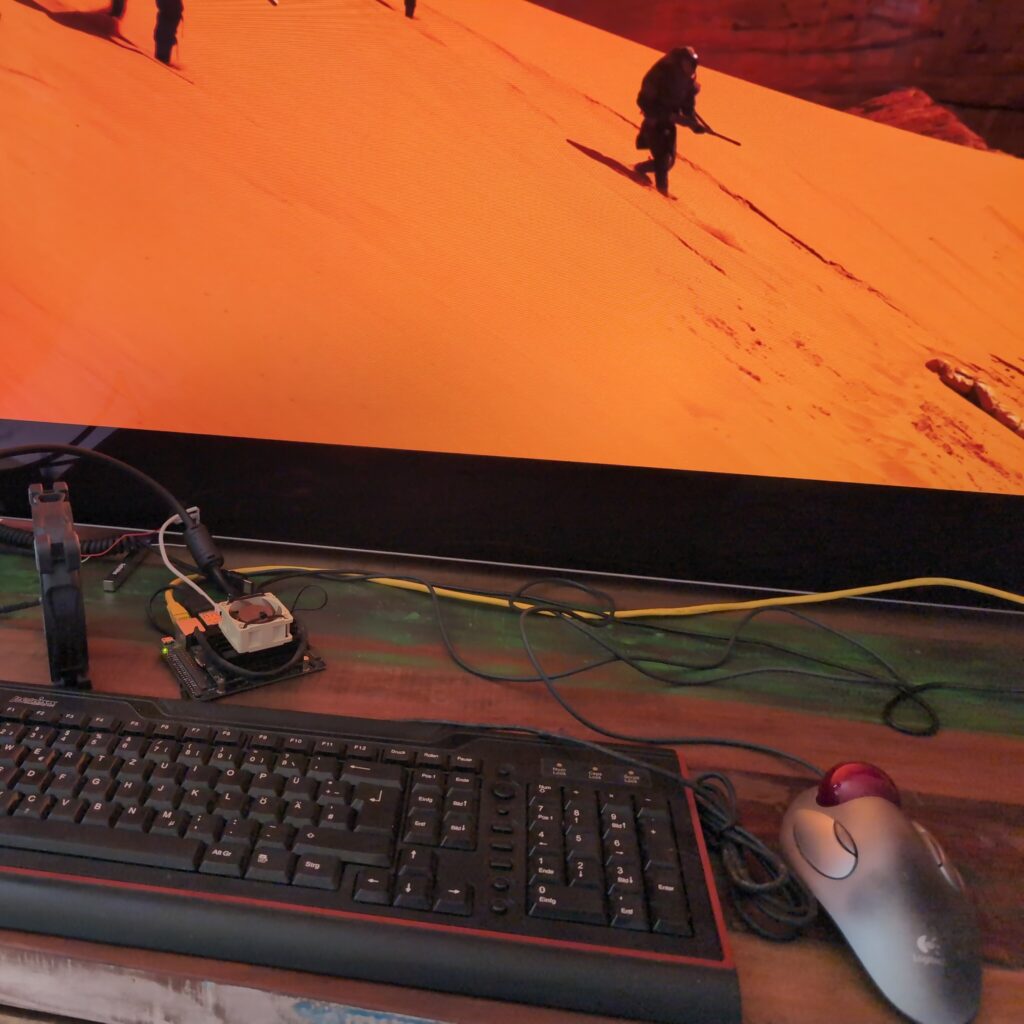
I decided on a plain install without GApps. For my network connection I used Ethernet, though WiFi should work with a dongle, a wired connection should be a bit more reliable and faster. Next, I sideloaded F-Droid with adb and installed the Aurora Store. I installed the YouTube App and the Jellyfin client, Termux, VLC and a web browser. I did all that with a keyboard and mouse connected, but both my TV Remote and my Logitech Harmony Hub phone app worked perfectly out of the box via HDMI CEC.
Testing
At first, I noticed HDR being flaky in Jellyfin. It turns out that the auto bitrate adjustment picked a value that was too low for HDR. I set it manually to the highest limit and it has been working fine since. I also had issues with some files stuttering. That I could easily resolve by switching Jellyfin to using libVLC rather than ExoPlayer. Next there were some audio issues, such as muffled sound or none at all for certain video files. I fixed it by changing the settings to always down-mix 5.1 to stereo which is what I’m using anyway. I also enabled bitstreaming DTS.
Further testing revealed that YouTube still failed to stream HDR. I’ve been unable to find a solution for that as of yet, but this one I can live with. I also noticed that the Fan I had attached to the Jetson didn’t want to spin, so I removed it. This indicated to me that the Board was running in its default, more efficient mode and not the significantly faster MaxP mode. I didn’t quickly find a way of changing that, but since performance is smooth all the way, I don’t feel the need to use more electricity anyway.
Comparison to SHIELD TV Pro
You definitely lose some features compared to using a Shield TV Pro, the big ones to me being:
AI upscaling (I can live without but it is a loss, maybe some day it will be added to Jellyfin serverside)
YouTube HDR (likely fixable)
Chromecast (Could be added with GApps, but since YouTube device linking still works the main reason I would want to cast is covered)
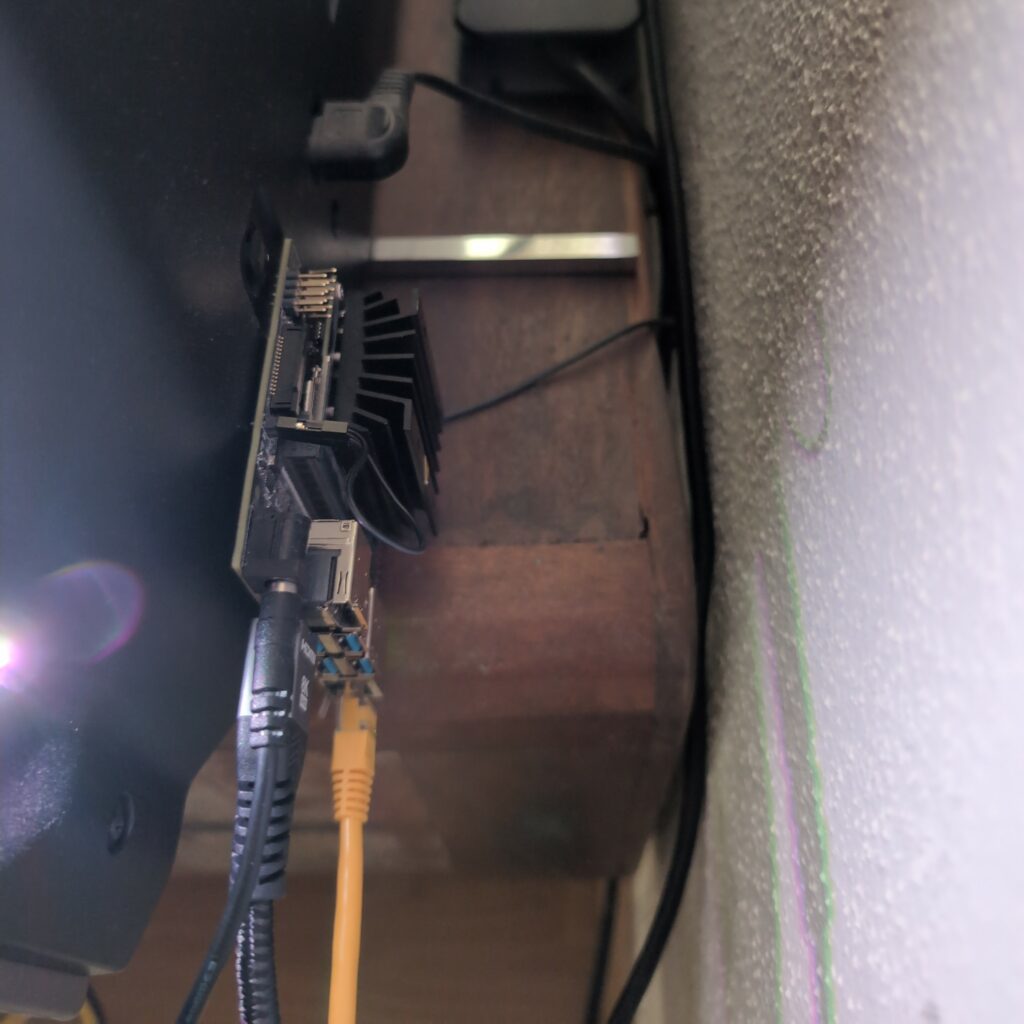
The standby power consumption will also be likely higher, since as of now I haven’t found a way yet to get the Jetson to sleep. Likely Kodi would also have trouble with convenient sleep handling as well, though I didn’t test it. You’ll likely want to hide your Jetson as well, since it just doesn’t look as sexy as a SHIELD.
What you do gain though is privacy, security and flexibility. I also enjoy having four more USB Ports to charge my controllers.
Should you get a Jetson Nano instead of a SHIELD for Android TV?
Probably not. If you already have one, this is a great use for it. The entire setup took me a couple of hours, but in the end it works nearly as well as the SHIELD while being way more private and secure. If you don’t already have one though, you should probably do more research and consider a Raspberry Pi 5 or a multimedia mini-PC with Kodi or even Android TV first. While it’s hard for me to say whether they will provide a better experience overall, they will definitely have a longer remaining lifespan due to them being so much more popular.
2025 Update
As of 2025 I am still using this setup, however I have since installed a small Noctua fan to the Jetson since it was running fairly hot, and I have partially switched to Findroid to mitigate some HDR streaming issues I was having with other apps.
Since the beginnings of time, I have been using a simple tweak across all my Android devices to improve their responsiveness. Surprisingly, I don’t really see it being talked about. I have never met even an enthusiast that also uses it. I’m talking about lowering the Android Animation Scale to speed up transitions across the OS and every app.
Understanding Android Animation Scale
Animation scales determine the duration of UI transitions, like switching between apps or interacting with elements. These animations are an essential part of Material Design, Android’s design system. They are used to communicate the paper like layer metaphor to the user, guiding them while making transitions smoother and less jarring. They also mask delays and loading times, however I found that for many years most devices are faster than the default animation speed conveys. On slower devices, default animations might feel too lengthy, emphasizing lag. Adjusting the scales can thus make both slow and fast devices feel more immediate. Luckily it’s easy to adjust the global animation scale – although it will only affect apps that actually use Androids default UI toolkit – which is most of them.
Modifying Animation Scales
Activate Developer Options:
Navigate to Settings > About phone.
Tap Build number seven times to enable developer mode.
Change Animation Scales:
In Settings, go to System > Developer options.
Under the Drawing or Animation section, locate:
Window animation scale
Transition animation scale
Animator duration scale
Typically set at 1x, changing these to 0.5x will make animations twice as fast, offering a swifter feel. However, setting them to 0 will disable them entirely.
Key Points to Remember
Perceived vs. Real Speed: Tweaking animation scales boosts perceived speed, not actual device performance. Sometimes you will still need to wait after the animation, but other times you may actually be able to resume slightly faster, if the animation at 1x was masking a surface that was otherwise ready for interaction
Disabling Animations: Setting scales to 0 removes animations, but this can harm the user experience. Material design animations convey information; eliminating them might make interactions less intuitive. I found 0.5 to be the sweet spot.
App Behavior: Some apps with custom animations might not align well with altered scales. If you find that bothering, consider setting only the animator duration scale back to 1.
You may not be able to go back: Unmodified devices will feel noticably slower and more sluggish.
In essence, adjusting animation scales can improve the user experience on Android devices. Why this is so obscure is beyond me – for me it’s a must-change setting on any Android device.
Signal is the go free and open source messenger app for privacy conscious people, but it there are some issues and limitations. One criticism is that it doesn’t integrate its backup system well with cloud storage. For instance, WhatsApp will more easily allow you to store backups on Google Drive. Apart from that, usage of the Signal backup restore function is not particularly well explained and crashes are very common due to a fairly simple issue. I went down the rabbit hole to analyze the root cause.
When moving to a different device or freshly setting up an existing one, you probably want to keep your chat history. I had that use case recently, when I installed GrapheneOS on my Pixel 6. A while beforehand I had already heard from a friend that restoring a Signal backup is buggy. They were experiencing crashes and had to give up on restoring their old messages, since backups can only be restored when newly setting up the app. Later on, restoring isn’t possible. There is also a feature to directly transfer chat history from one device to another, but that also didn’t work for them and wasn’t even an option for me, since I was using only a single device.
What’s the issue?
Backups can be enabled and scheduled in the Signal settings. When you first do that you’ll get a 30-digit passphrase that you will need to restore the backup. Once that is done two Signal backups will always be available in the specified directory. When you want to restore them, you have to newly install Signal on the respective device. Next choose the restore option and the file. Enter your passphrase and confirm. If it works, it should be pretty quick. When I finally got it to work, it only took about 3 minutes to restore a 5GB backup including all media. The problem is that for me and a lot of users, the app just crashes after a few moments.
So why does this happen?
Signal is open source, so it’s possible to just debug the code to find the cause. Also researching online will yield multiple user reports about this happening. And finally you can look at the logcat of the app. On the first startup screen of a newly installed Signal app, you can also just tap the icon about ten times. That will show you the app logs. If you do that after experiencing such a crash, there will be one of two exceptions with relevant stack traces. One indicates a negative array length being used when initializing an array. The other one being an out of memory error. There is a third possibility to that will probably result in an ArrayIndexOutOfBoundsException, however I haven’t been able to observe this since it’s rare.
Looking at the relevant code, you can see that Signal stores the backed up data in multiple chunks, but in a single file. However when decrypting the backup, the app doesn’t even know how large each chunk is. That information is also encrypted inside the backup file. Later that information is used to allocate a buffer. If that buffer is thus too large or the size is negative the app will crash. The third option can happen when the decrypted buffer size is reasonable, but the restoration process will still fail.
What causes the buffer size to have such random values?
Well apparently the app (currently) has no way of checking whether the passphrase you enter for decryption is correct. Because of this, it will simply decrypt it even with an incorrect passphrase and take the value as a number from where the chunk size (=buffer size) WOULD be if the file was decrypted correctly. That’s why entering different wrong passphrases can yield different stack traces. So yeah, that’s it. If Signal crashes for you when restoring a Signal backup, you’re probably entering a wrong passphrase.
And that’s indeed what I and some other users were doing. I was entering my Signal PIN, another user was entering an old passphrase. The UI IMO does not give sufficient information or a reminder to a user that a 30 digit passphrase needs to be entered. Thus, there are two issues: First are the crashes when entering a wrong phrase, due to insufficient error handling and because Signal doesn’t know the chunk size at that time. Second, the UX is very imperfect, possibly causing users to enter the wrong value.
How can the Signal backup functionality be fixed?
I proposed these improvements be made to solve this issue:
The text should be adjusted to remind the user that the 30-digit backup passphrase is required. I forgot this, and many users will forget it, thus entering the Signal PIN or something else, causing confusion.
The error should be caught properly. If the chunk size is unreasonable, immediately display a message stating that the passphrase isn’t correct, or just catch any exception with a reasonable message. This would be a quick fix to prevent crashes and confusion.
When activating backups the passphrase is shown. IIRC you just have to check a box that you wrote it down. I think it would be better to have the user write it back. Maybe using words would be more memorable, too. Given the number of people who are reporting here, a lot of users may have forgotten the passphrase, so UX improvements may be necessary.
Review if it makes sense or is necessary to even encrypt the chunk size. Can it not be in plain in the file header or be a fixed value?
It should be more clear how to change the passphrase. When I switch my phone I may remember to check if I have a recent backup and look at the Chat Backup menu. If I then realize I don’t have the passphrase anymore, it’s not immediately clear how to proceed.